Oracle Enterprise Manager Cloud 12c Release 4 (12.1.0.4) Installation High Level Steps
1) Install the Prerequisites
2) Remove the Enterprise manager if its already installed on db
3) Set the DB Parameters
4) New Enterprise manager Installation
Before you start with installation make sure required RPM and DB is up. In my current database I am already enabled the db enterprise manager do I am uninstalling that.
Required RPM's
# OL5 and OL6yum install make -yyum install binutils -yyum install gcc -yyum install glibc-common -yyum install libaio -yyum install libXtst -yyum install libstdc++ -yyum install glibc-devel -yyum install sysstat -y yum install glibc -yyum install setarch -yyum install libaio -y # OL5 yum install rng-utils -yyum install glibc-devel.i686 -yyum install glibc-devel.i386 -y# OL6
* Run the below command to uninstall the database enterprise manager
emca -deconfig dbcontrol db -repos drop -SYS_PWD Passw0rd1 -SYSMAN_PWD PAssw0rd1

* Set the below parameters
sqlplus / AS SYSDBAALTER SYSTEM SET processes=300 SCOPE=SPFILE;ALTER SYSTEM SET session_cached_cursors=200 SCOPE=SPFILE;ALTER SYSTEM SET sga_target=2G SCOPE=SPFILE;ALTER SYSTEM SET pga_aggregate_target=1G SCOPE=SPFILE;ALTER SYSTEM SET shared_pool_size=600M SCOPE=SPFILE;-- May be required if using older versions of DB.ALTER SYSTEM SET job_queue_processes=20 SCOPE=SPFILE;-- Restart the instance.--ALTER SYSTEM SET log_buffer=10485760 SCOPE=SPFILE; --ALTER SYSTEM SET open_cursors=300 SCOPE=SPFILE;STARTUPSHUTDOWN IMMEDIATE

*Restart the database

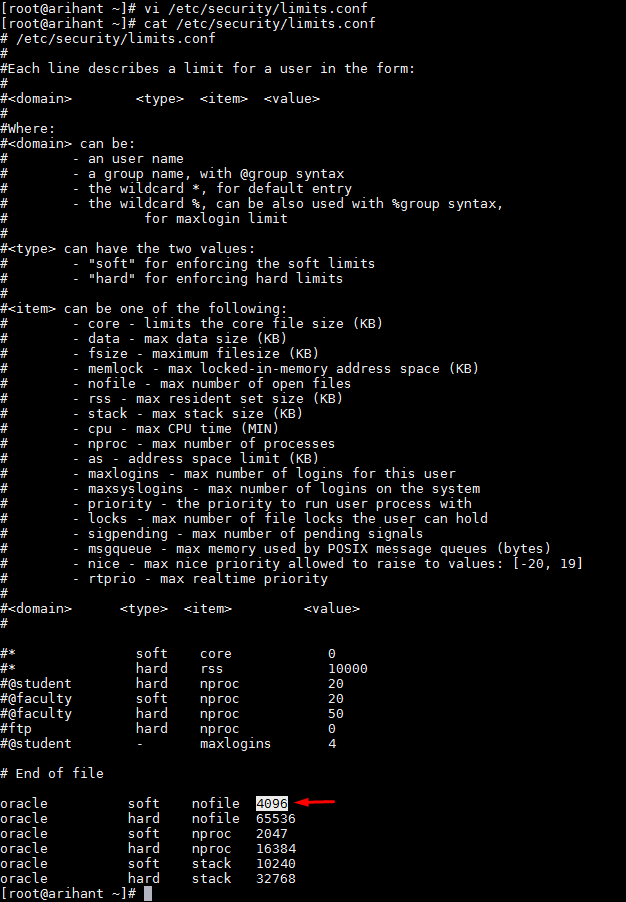
* Set the limit parametre
* Create the below two folders
- oms12cr4
- agent12cr4

* Unzip the disk with the below conmmand
unzip -d em12cr4 em12104_linux64_disk1.zip.
unzip -d em12cr4em12104_linux64_disk2.zip
unzip -d em12cr4 em12104_linux64_disk3.zip


* Once the extract is complete go to extracted folder and run the ./runInstaller commnad.

 |
| Uncheck the check and click on Next |
 |
| Click on Yes |
 |
| Check the status of all the prerequisites and click on next. I have 64bit OS so I am skipping i686 library and click on next |

 |
| Click on Yes |
 |
| Select Create a new Enterprise Manager system with simple mode and click on Next |
 |
| Check the location and click on next |
 |
| Give the database credentials, password and click on Next |
 |
| Click on Install |

 |
If you see the above error go to oms/sqlplus/lib and run below command
make -f ins_sqlplus.mk install
|
 |
Login in putty with root user and run the below command
/app/oracle./oms12cr4/oms/allroot.sh
|

 |
| Click on Close |
 |
Now try accessing the URL |

The article provides a detailed step-by-step guide to installing Oracle Enterprise Manager Cloud Control 12c Release 4. It covers prerequisites, required RPM packages, database configuration, removal of an existing Database Enterprise Manager setup, directory preparation, software extraction, prerequisite checks, and the Enterprise Manager installation workflow.
ReplyDeleteThe installation process demonstrates several important cloud infrastructure concepts, including enterprise management software, database configuration, server prerequisites, and deployment of Oracle management components. The use of Oracle Enterprise Manager Cloud Control as part of an enterprise environment makes this a relevant example of Cloud Computing Projects.
The troubleshooting section is also useful because it shows how installation failures can require additional configuration and command-line intervention. Checking prerequisites, managing system libraries, configuring database parameters, and resolving installation errors are important aspects of maintaining reliable cloud infrastructure and secure enterprise environments. This provides a useful connection to Cloud Security Projects.
ReplyDeleteThe detailed sequence of database preparation, software extraction, installer execution, and post-installation access provides a practical example of how enterprise platforms are deployed and managed. Working with installation procedures and analyzing configuration requirements can also strengthen skills in handling structured technical data and operational information, making Data Analysis Training a useful complementary area.
ReplyDelete47404195
ReplyDeleteAğva
Marmaris
Dilovası
İlkadım
Arsuz
Çukurambar
Çerkezköy
Mezitli
Viranşehir
8F01A844
ReplyDeleteKepez
Dikili
Bahçelievler
Bayındır
Dikmen
Serik
Dalaman
Nilüfer
Edremit